
codeLinc 11 · Lincoln Financial
Steadfast: a life insurance needs plan, talked through
A conversation that walks someone through their family, income, debts and coverage, then shows how much life insurance would look after them, with every number explained and nothing meant to worry them. Priced by an underwriting model we trained ourselves.
Try it now
The planner works signed out and takes a few minutes.
Open the planner
See the dashboard
Sign in as demo@example.test, password steadfast-demo.
Sign in
How it’s built
The model we trained, compliance, security, architecture and method.
Read on
For the judges
Where to find each criterion
The ten criteria from the judging page, in order, and where each one is answered here.
- 1User interface & intuitivenessOne question at a time, chips for every answer, 16px type, and a plain explanation beside every insurance word.
- 2Functional requirements & impactDependents, income, debts and coverage go in. A priced needs plan with its math comes out, plus term vs permanent life.
- 3Solution design & innovationWe trained our own underwriting model, so every price on the page comes from this person's answers.
- 4Demonstration and presentationReal screenshots of every screen on this page, and a timed four-minute runbook.
- 5Does it work?The core flow runs signed out, end to end, with 450 automated tests behind it. Lincoln's own policies and advisors are built into the result.
- 6Technology platforms employedNext.js 16, PyTorch, FastAPI, Neon Postgres, the OpenAI Responses API, Vercel, and open data from the CDC and the Society of Actuaries.
- 7Security accommodationsDesigned around US insurance rules first, then hashed tokens, zod on every boundary, and a model that sees only a fact sheet.
- 8Technical creativityThe model explains and the code calculates. Any figure the model invents is caught before it reaches the screen.
- 9Architecture & methodologyA user flow through the model and the underwriting engine, a storyboarded conversation, docs as contracts, and a timestamped log of the night.
- 10ComplexityAn underwriting engine we trained ourselves: a survival model fitted to 47,469 US adults and priced with Society of Actuaries tables, held to 0.99 observed-to-expected deaths. Plus one API route, no chart library, and 450 tests that run in three seconds.
The prompt
What we were asked to build
“A conversational AI tool that walks someone through their situation (dependents, income, debts, existing coverage) and produces a personalized life-insurance needs assessment, explaining the reasoning and the math clearly without causing anxiety.”
Stretch goal: explain term vs whole life and surface the tradeoffs that apply to this person.
Most people who need this have never bought life insurance, and many of them are older. So Steadfast asks one question at a time, says why it asks, and accepts answers the way people actually say them.
The result leads with one rounded figure and a reasonable range, never an exact verdict, and every dollar traces to a line in the ledger. Term vs permanent life is shown in their own numbers, with the closer fit marked and the reason. Both stretch tradeoffs, buying term and putting the difference aside and splitting into two policies, come from the engine.
Core features
What it does, in eight pieces
Each part of the prompt, working in the app today. The tour that follows shows every screen.
- A guided conversationFamily, income, debts, coverage, then two health questions. Chips or their own words, one question at a time.
- A plan with its mathOne rounded figure, a reasonable range, and a ledger where every row states its assumption.
- Prices from our own modelA health class and term and permanent prices for this person, from the underwriting model we trained.
- Term vs permanent, with tradeoffsOnly the rows that differ for them, the closer fit marked, plus put-the-difference-aside and a two-policy option.
- Questions answered from the planAsk anything about it. Answers use only figures already on the page.
- Life CanvasSketch a different version of their life on the saved plan: a new baby, a raise, a paid-off mortgage, five years ahead. Every number and price redraws live, and nothing is saved until they say so.
- The handoffA one-page PDF and a request for a licensed Lincoln Financial advisor, with the plan attached.
- Written for first-time buyersA plain explanation beside every insurance word, 16px type, and a guide built from the same glossary.
Feature tour
Every screen
Captured from the running app as the demo family. Open any one for the full-size screenshot.
- steadfast/calculator
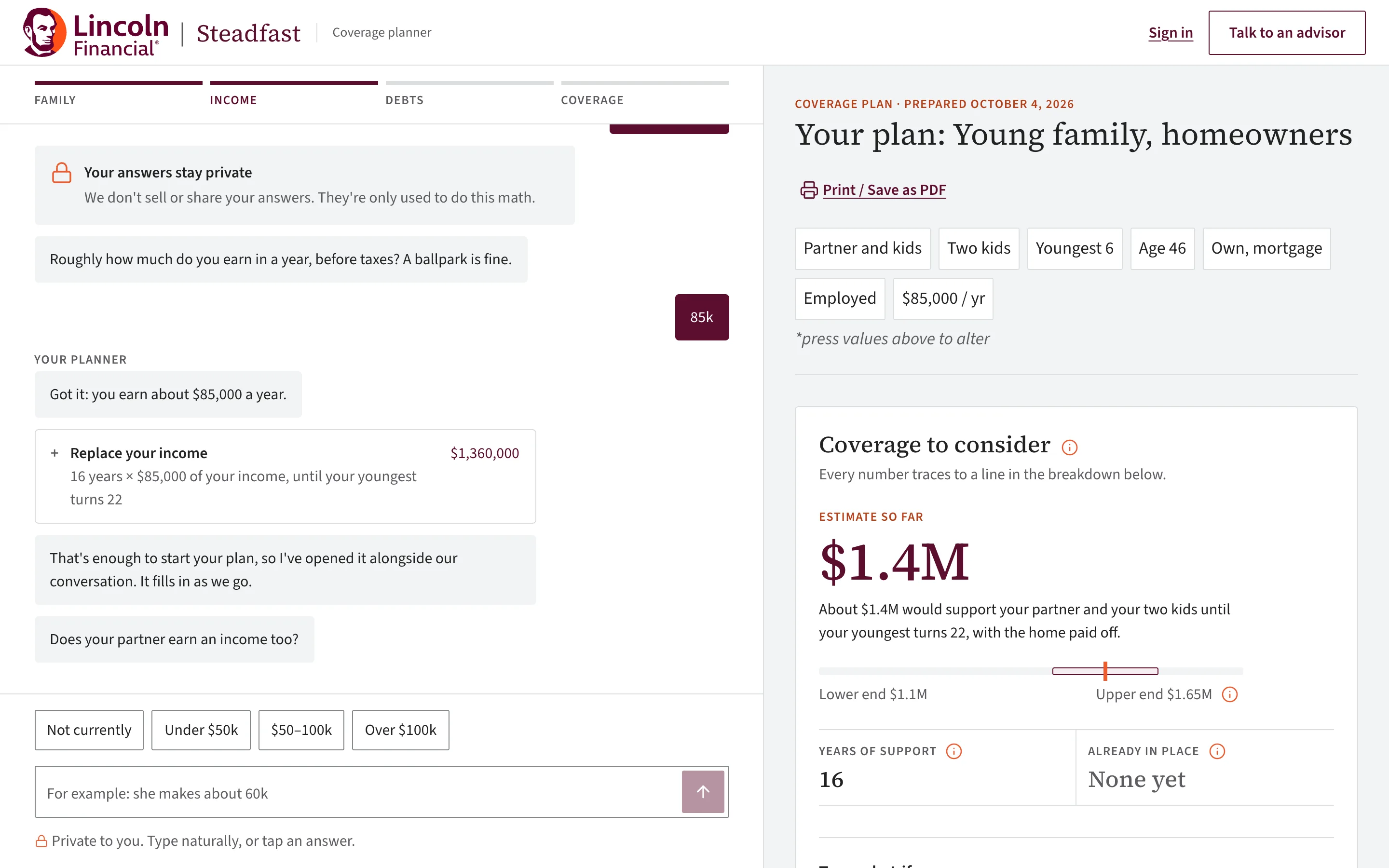
01
A conversation, one question at a time
Family, income, debts, then coverage. Every question has answer chips, a line on why we ask, and room to type in their own words: “240k”, “$1,800 a month”, “my wife smokes, I don’t”. It works signed out.
- steadfast/calculator
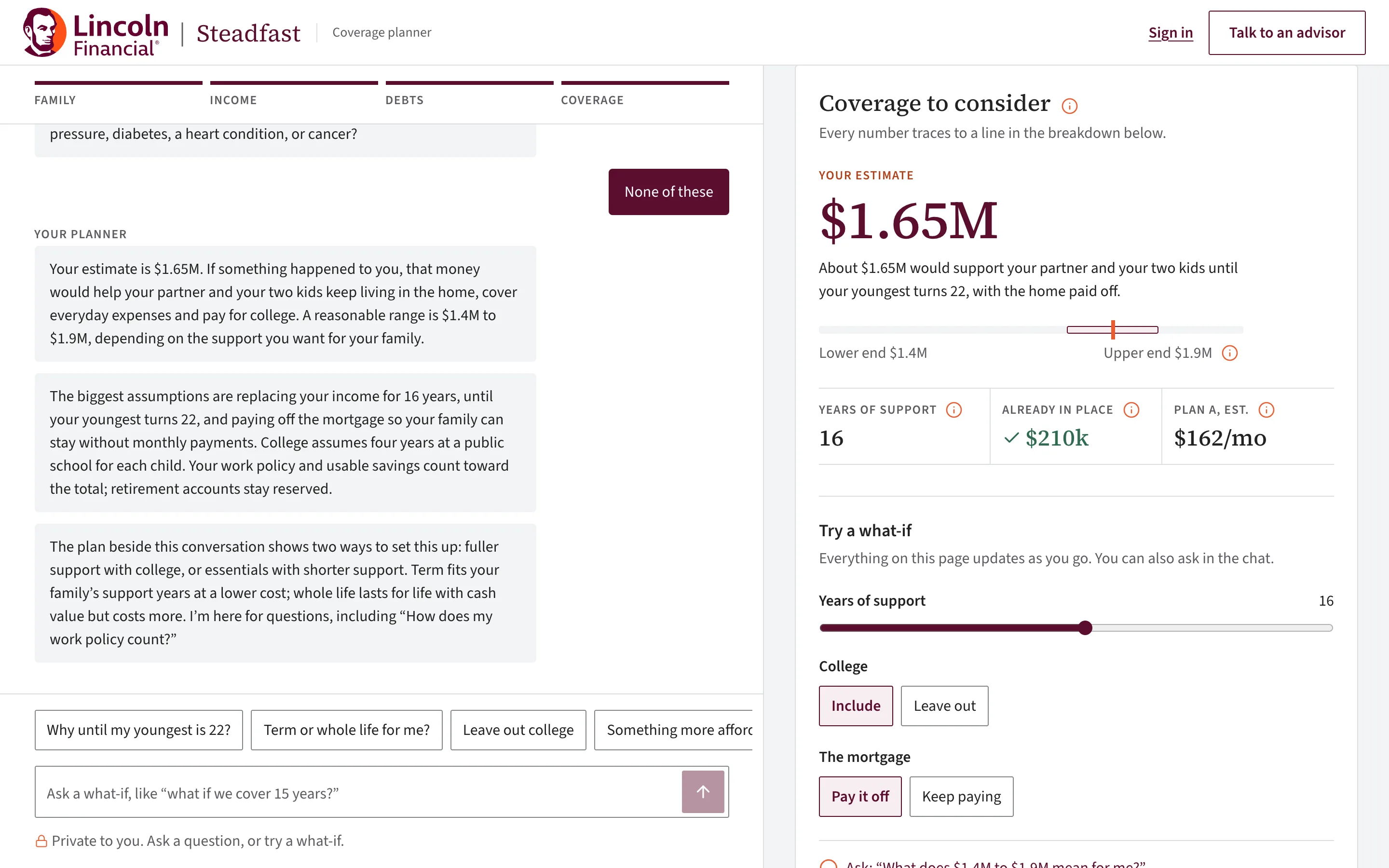
02
The plan builds while they talk
One rounded figure with a reasonable range, and a ledger beside it. Every row states its assumption, like “10 years × $85,000”, and the rows always add up to the figure.
- steadfast/calculator
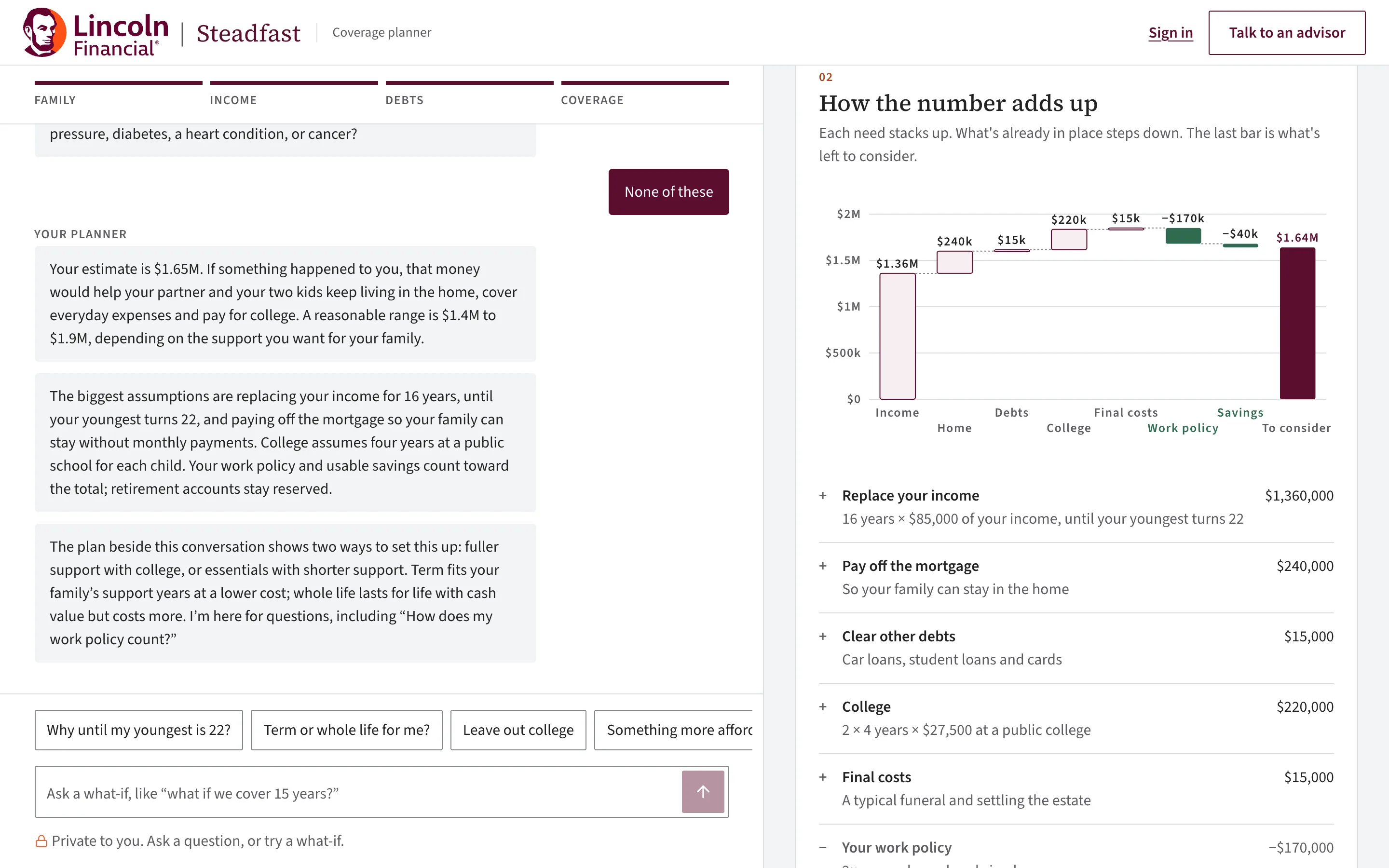
03
Five charts, drawn by hand
How the number adds up, the family timeline, income continuity, a cost explorer and term vs permanent life. Plain SVG with no chart library, so each one fits a 390px phone.
- steadfast/calculator
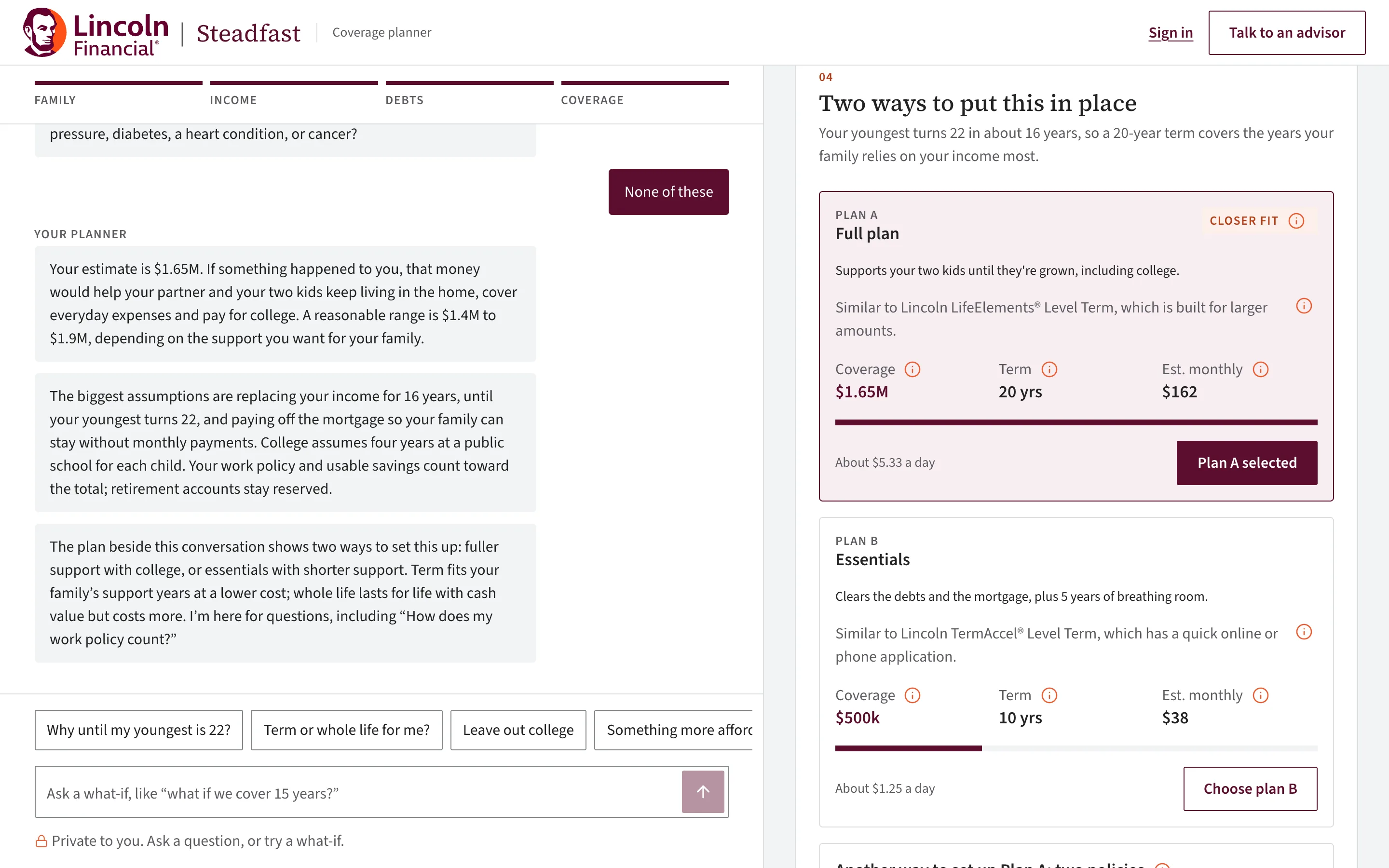
04
A full plan and an essentials plan
Plan A covers everything they told us about. Plan B keeps the essentials at a lower monthly cost. Both are priced side by side, each names the Lincoln policy it’s closest to, and they choose.
- steadfast/calculator
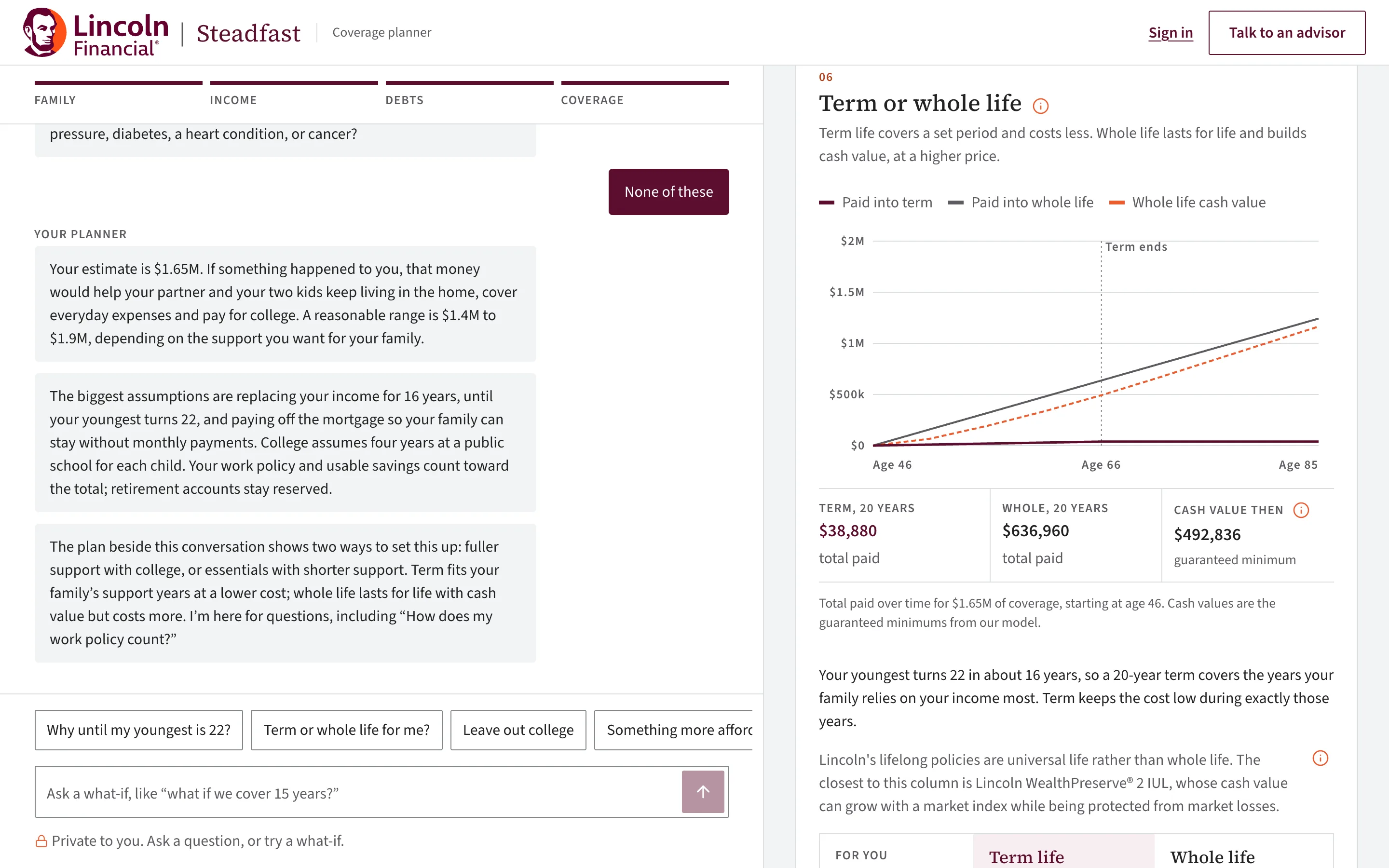
05
Term or permanent life, in their dollars
Two sentences of explanation, then only the rows that differ for them, with the closer fit marked and the reason. It also shows buying term and putting the difference aside, and a two-policy option when that costs less.
- steadfast/calculator
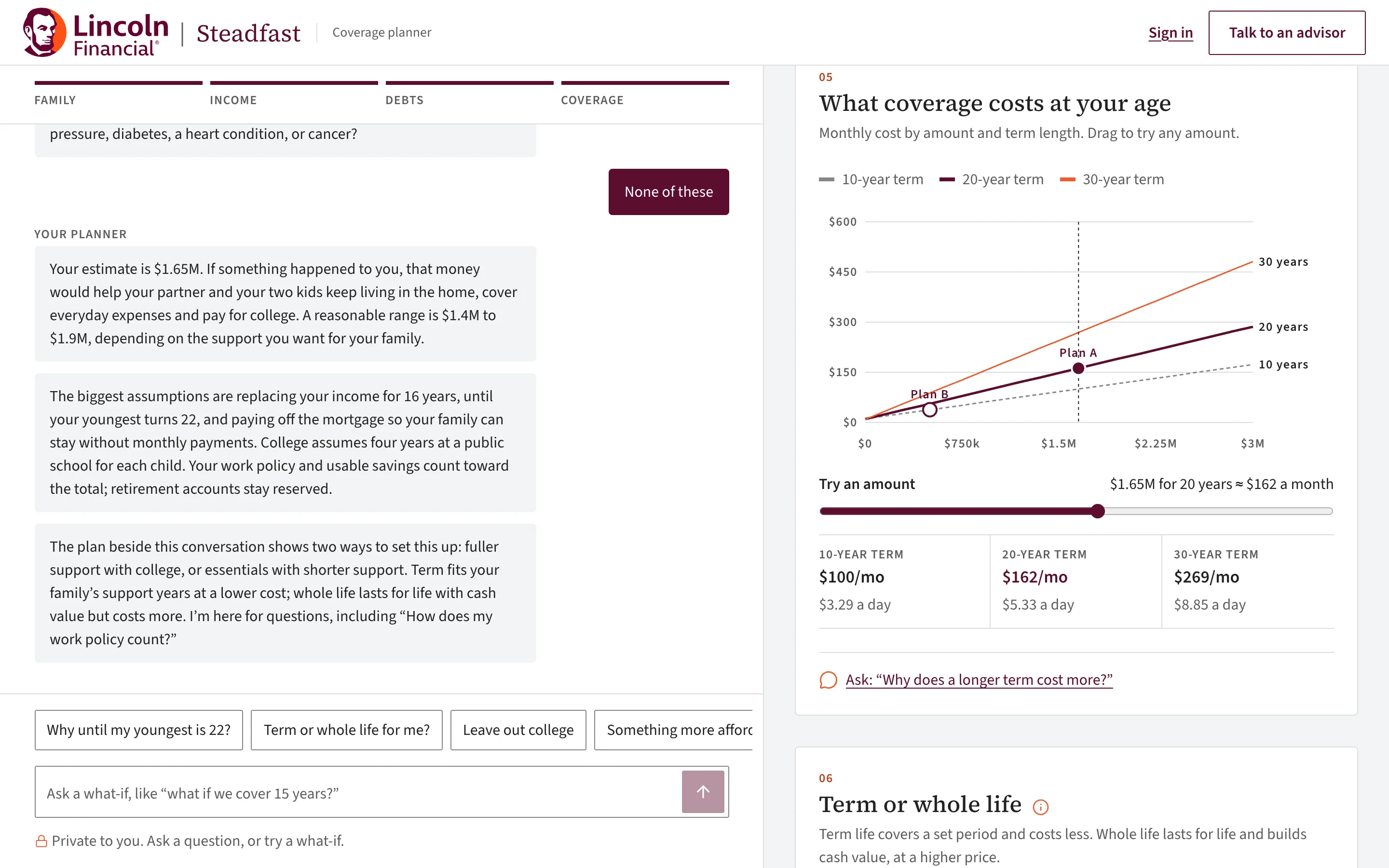
06
Prices from our own underwriting model
Two short health questions, about tobacco and four common conditions, set a health class with a plausible range. Build is assumed average, and the page says so. The class, the range and the prices come from the model we trained.
How the model was trained - steadfast/calculator
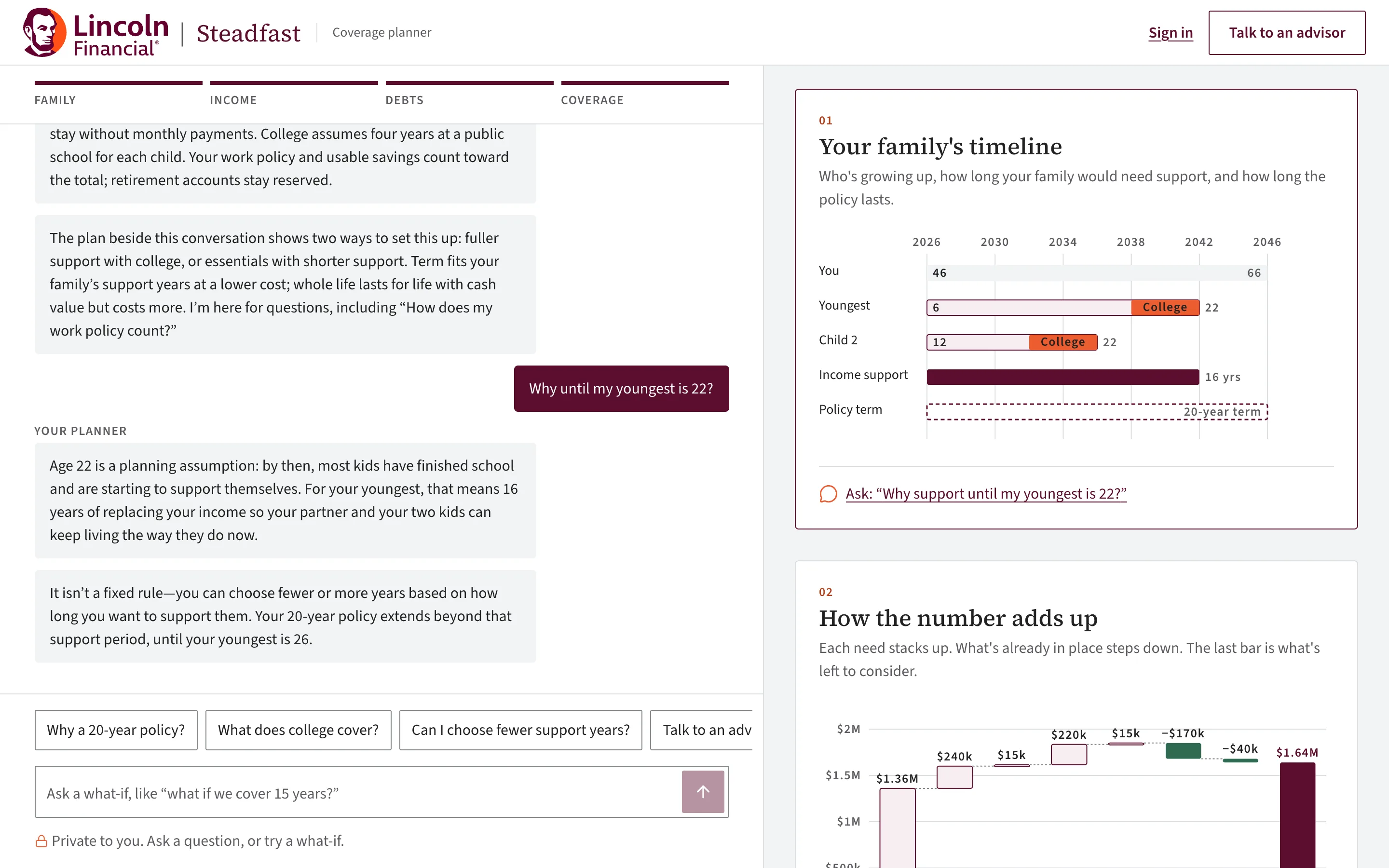
07
Questions answered from their own plan
After the plan, they can ask anything: “Why until my youngest is 22?” Answers use only the figures on their page.
- steadfast/dashboard
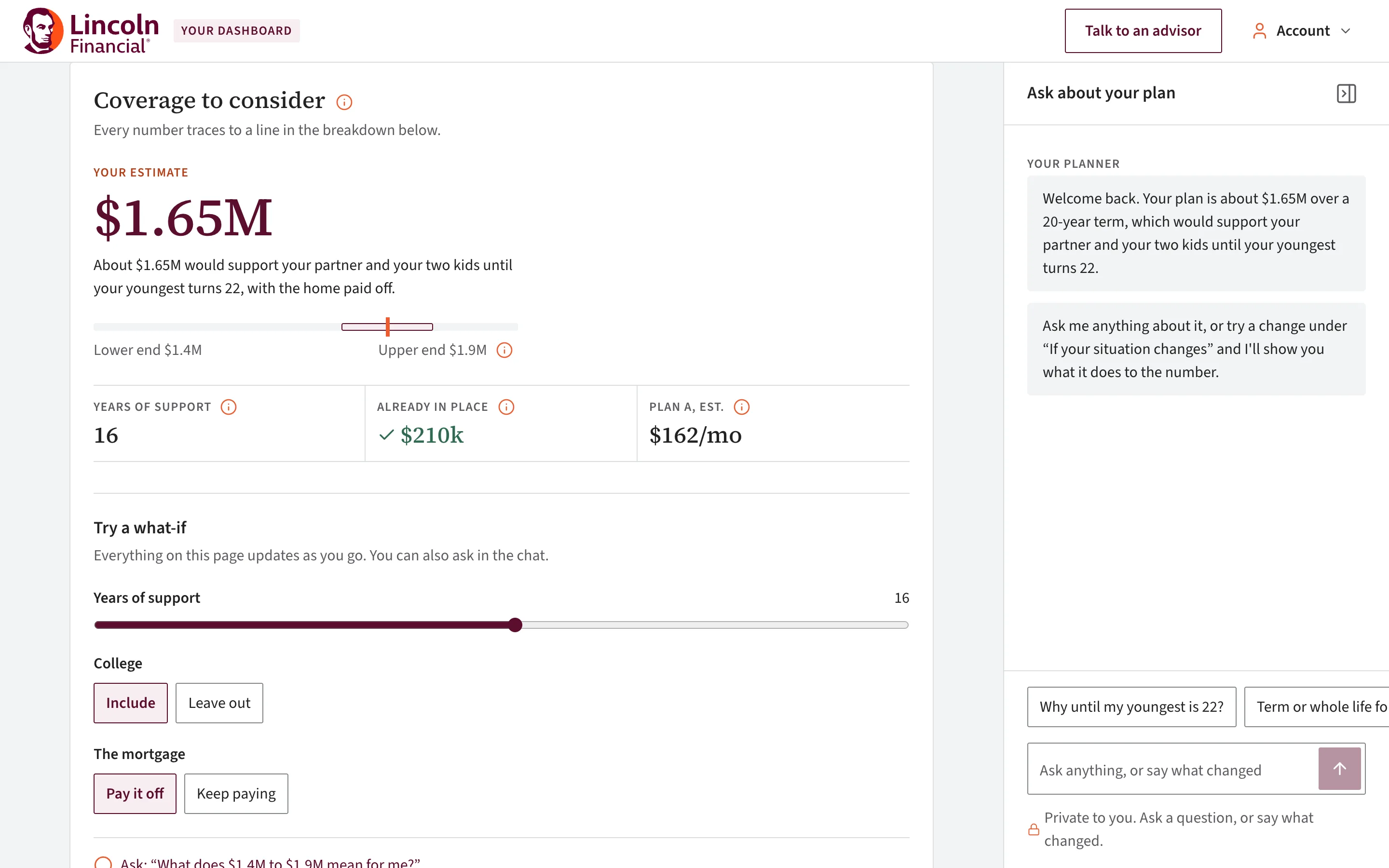
08
Save it, and come back to a dashboard
Saving needs only an email; a link to choose a password follows. The dashboard holds the plan, one-tap life changes, health toggles and a chat that reprices everything live.
See the dashboard - steadfast/calculator
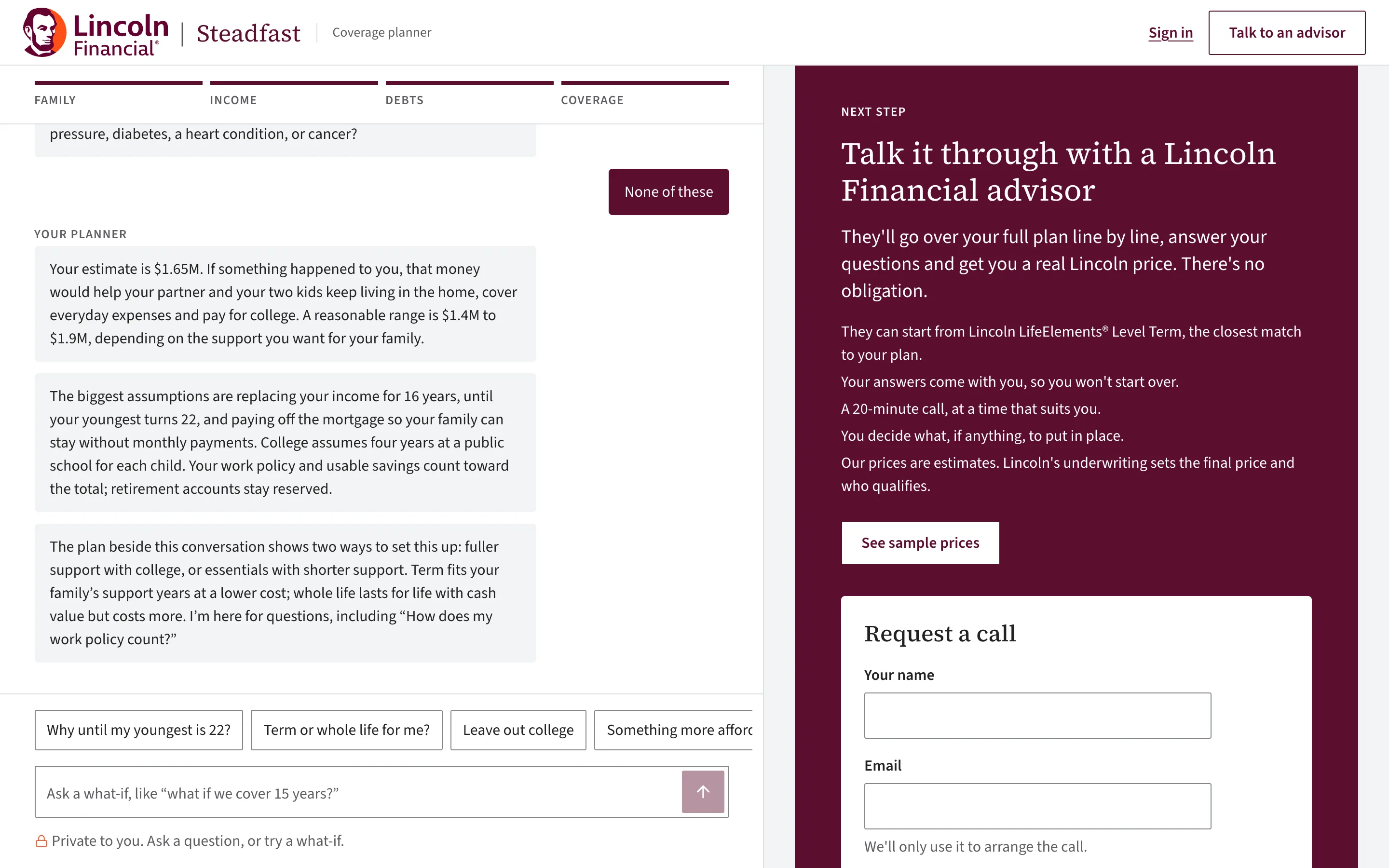
09
Something to take to the kitchen table
A one-page PDF of the assessment, with the math, term vs permanent life and the pricing notes, and a request for a licensed Lincoln Financial advisor to call, with their plan attached.
- steadfast/calculator
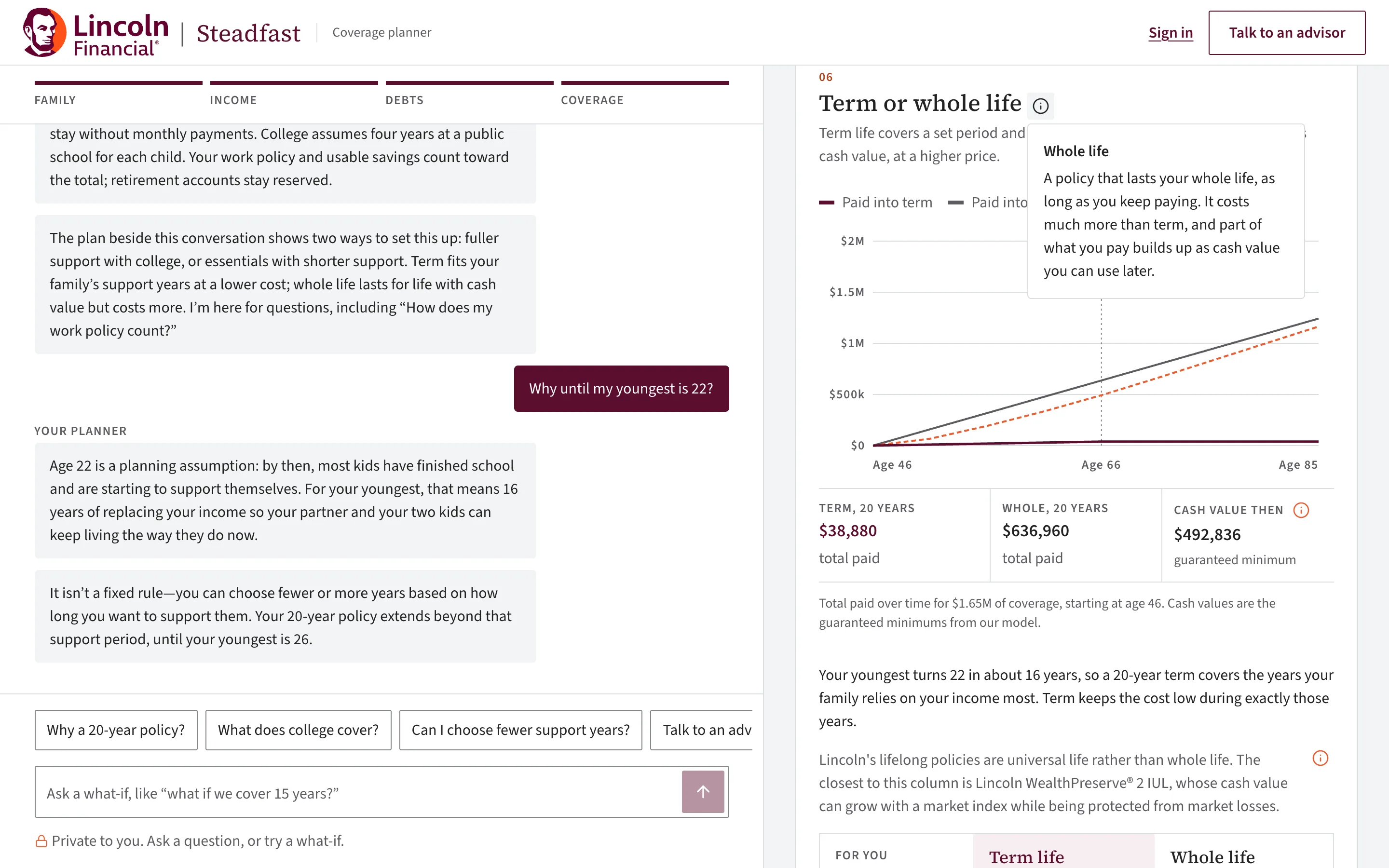
10
Written for people buying for the first time
Insurance words come with an info button and a plain explanation that opens on tap, hover or keyboard. A plain-words guide answers the questions people ask before they buy, from the same glossary, and a test keeps every explanation to three sentences with no jargon. Reading text is 16px or larger, and there’s no red anywhere.
Read the guide - steadfast/calculator
11
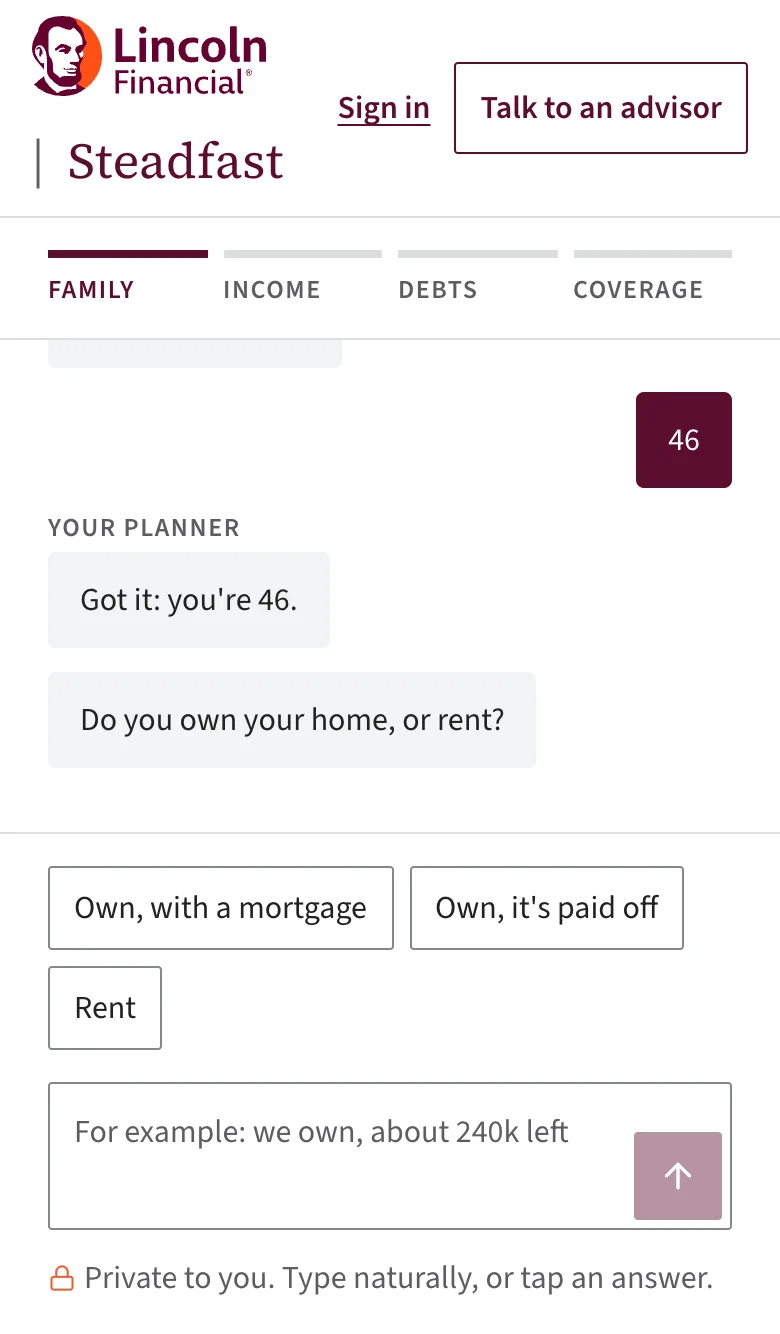
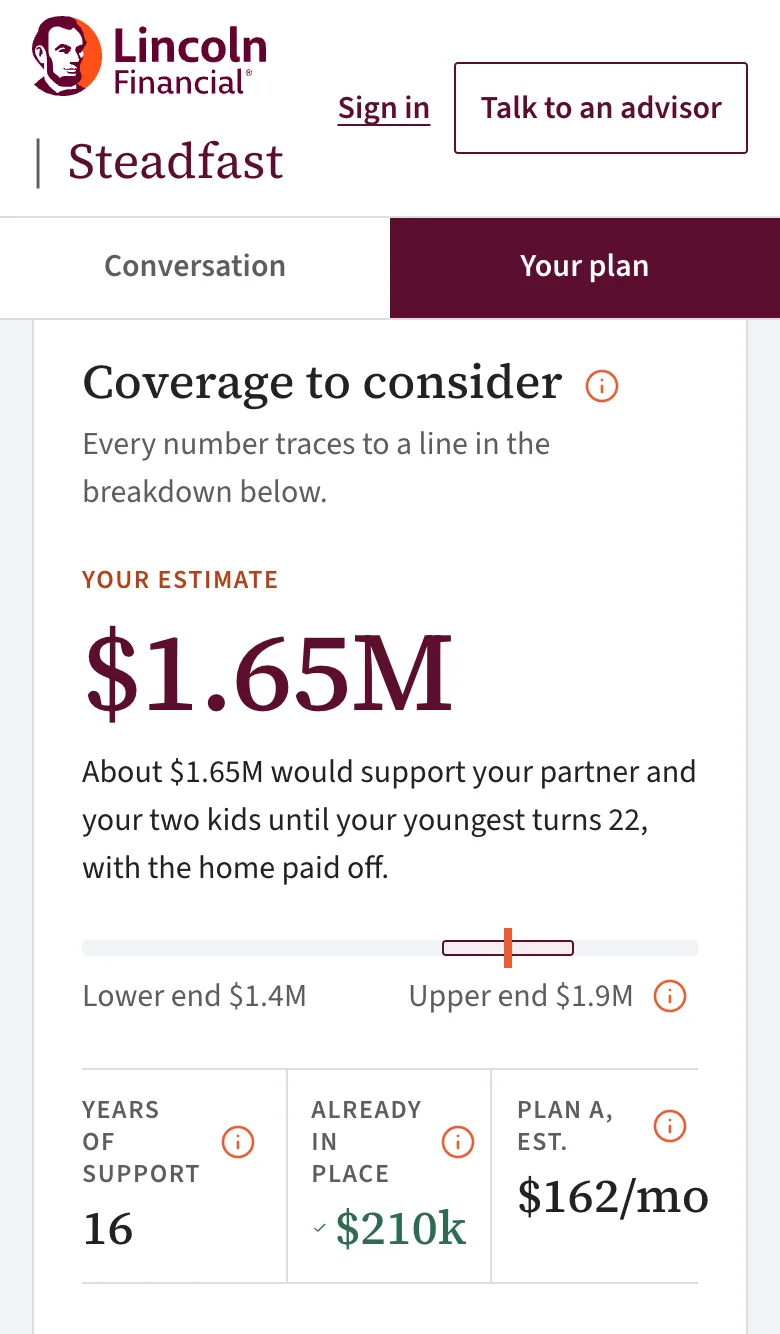
Just as calm on a phone
Below tablet width the conversation and the plan become two tabs, so each gets the whole screen. Chips stay large enough to tap, and every chart redraws to fit.
The dashboard
A plan that keeps up with their life
A saved plan comes back here. Every control on the page changes the same facts the conversation collected, so the whole plan, its prices and the chat move together.
- steadfast/dashboard
01
The saved plan, as it opens
The figure, its range and the ledger, with the planner’s welcome in the chat beside it. What-if controls sit right under the number: years of support, college, the mortgage.
- steadfast/dashboard
02
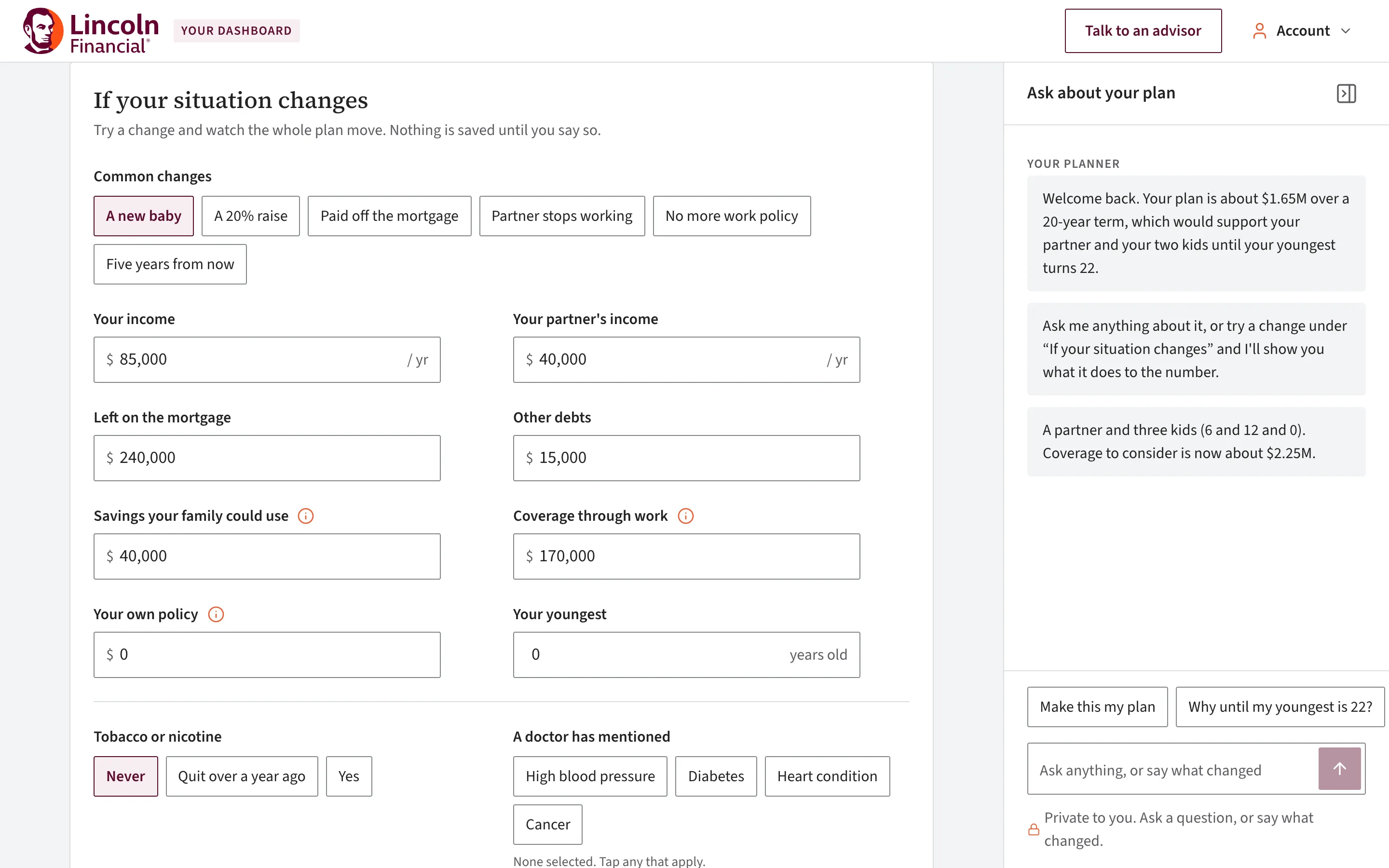
Life Canvas: one-tap life changes
The Life Canvas lets them sketch a different version of their life and watch the plan redraw. “A new baby”, “A 20% raise”, “Paid off the mortgage”, “Partner stops working”, “Five years from now”: each one is a patch of facts over the saved answers, so the whole plan recomputes and the chat says what moved. Nothing is saved until they say so.
- steadfast/dashboard
03
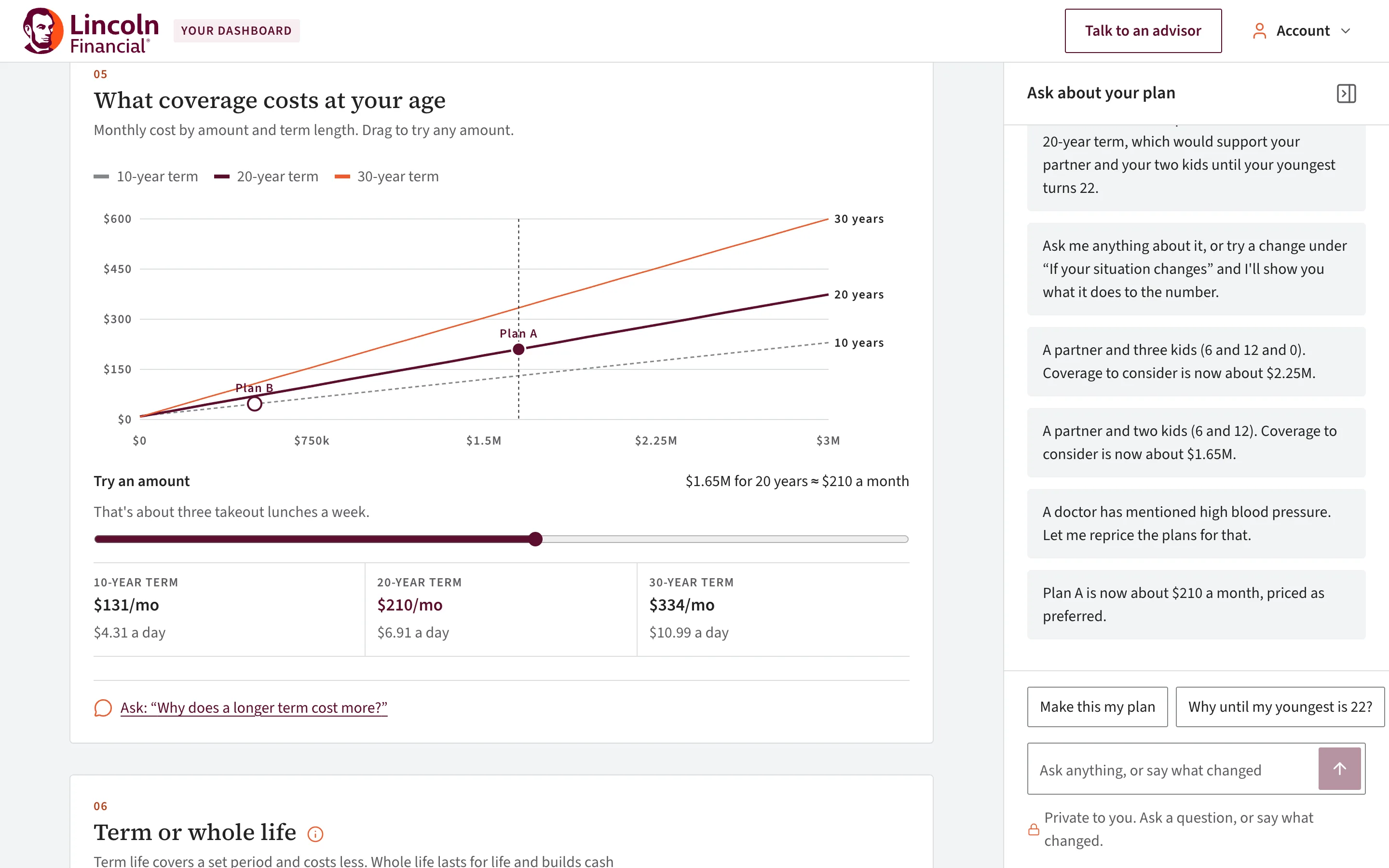
Health changes reprice through the model
Toggling “High blood pressure” sends the new answers to the underwriting engine. Plan A moves from $162 to $210 a month, the class is named, and every chart redraws. “Make this my plan” keeps it.
The chat on the right is the same planner, smaller and collapsible. Typing “we rent now” or “I’m 36 now” applies the change the same way a chip does, and suggested questions like “Why until my youngest is 22?” are answered from the plan’s own fact sheet.
Nothing is saved until “Make this my plan”. The saved plan is one row per account, so saving again replaces it, and “Talk to an advisor” sends the current plan with the request.
User flow
What happens at each step
The person's path from the first question to a saved plan, with what runs behind each step: the app does the math, the model reads and explains, and our underwriting engine sets the class and the price. Every remote piece has a local fallback, so the demo never stalls.
The app
Next.js, plain TypeScript. Owns the conversation and every dollar of math.
The model
OpenAI Responses API. Reads and explains, never calculates.
Underwriting engine
Our survival model and SOA pricing, as a Python service.
Step 1
They start a conversation
From the landing page into the planner, signed out. Four stages, one question at a time: family, income, debts, coverage.
Behind it
- The app
Picks the next question from the step list, with answer chips and a line on why we ask.
If it fails: Nothing remote yet. The first screen never waits on a network call.
- The app
Step 2
They answer in their own words
A chip, or a typed sentence like “married, two kids, 4 and 9, I make about 90k”.
Behind it
- The app
A local parser reads money shorthand, ages, households and health first.
- The model
Messages of 8 words or more also go to the model, which returns structured facts the app checks field by field. Answers are cached by request hash.
If it fails: No key or a slow reply: the local parse stands and the conversation moves on.
- The app
Step 3
The plan builds beside them
Each answer adds a line to the ledger on the right: income to replace, the mortgage, college, minus what work already covers. The total updates as they go.
Behind it
- The app
Needs math in ordinary code: the ledger, the range, and Plan A against Plan B. The model never touches a number here.
If it fails: Pure arithmetic in the browser. There is nothing to fall back from.
- The app
Step 4
Two health questions
Tobacco, and whether a doctor has ever told them about blood pressure, diabetes, heart disease or cancer. Build is assumed average and the page says so.
Behind it
- Underwriting engine
Age, sex and the health answers go to the engine with the needs. It returns an underwriting class with its plausible range, term prices from 10 to 30 years, a permanent life price with guaranteed cash values, a recommended term, and sometimes a cheaper two-policy ladder.
- The app
Requests are debounced 300 ms, checked with zod and cached. Both plans are priced and the charts refit to the engine's curve.
If it fails: Engine down: local rate tables price the plan silently, and the page still reads as finished.
- Underwriting engine
Step 5
The plan is explained
A summary streams into the chat: what the money does, in their words, with the range and the monthly price for term and permanent life side by side.
Behind it
- The app
Builds a fact sheet from the plan and the engine's prices: every figure the model is allowed to say, already formatted.
- The model
Writes the summary from the fact sheet only, three sentences a bubble.
- The app
A number guard checks the text. Any dollar figure not on the fact sheet is logged and that answer is never cached.
If it fails: No model: a template summary from the same fact sheet takes its place.
- The app
Step 6
They ask what if
“What if I paid off the mortgage?”, “Why 20 years?”, or a preset like “A new baby”. The plan and the prices move with the answer.
Behind it
- The app
Known what-if commands run instantly as plan overrides, with no round trip.
- The model
Open questions get an answer from the fact sheet plus structured overrides the app applies by name, never free text.
- Underwriting engine
Every change reprices through the engine, so the chat and the page never disagree.
If it fails: Canned answers cover the common questions and the overrides still apply.
- The app
Step 7
They keep it
Download the PDF, ask for an advisor, or save the plan to an account and come back to the dashboard.
Behind it
- The app
Plan saved to Postgres, one per account. A set-password link goes out by email, stored only as a hash and good for 24 hours.
If it fails: No email key: the link prints to the server log and the demo continues.
- The app
How it works
From an answer to an explained plan
The model reads and explains. Arithmetic is ordinary code, so a figure on screen is never a guess.
Step 1
They answer
A chip or a typed sentence.
Step 2
Read locally
A parser handles money shorthand, ages, households and health. Messages of 8 words or more, or ones it can’t read, also go to the model.
Step 3
Needs math
Plain TypeScript works out the plan and its ledger. The model never computes money.
Step 4
Priced
Our underwriting engine prices both plans. Requests are debounced and cached.
Step 5
Fact sheet
Every figure the model may say, already formatted, built from the plan and the engine’s prices.
Step 6
Explained
The model writes the summary and answers from the fact sheet only.
Step 7
Checked
Any dollar figure that isn’t on the fact sheet is logged, and that answer is never cached.
The underwriting engine
We trained our own underwriting model
No public API turns health answers into an underwriting class and a price. So we built one from public data: a PyTorch survival model trained on 47,469 US adults, priced with Society of Actuaries tables, and checked against published rates.

Trained with PyTorch, served with numpy
A Gompertz proportional-hazards survival network, trained five times on bootstrap resamples with the exact left-truncated, right-censored likelihood. The trained ensemble is exported to 112 KB of numpy weights, so the live engine serves without PyTorch and fits a Vercel Python function. One script rebuilds everything from the public sources in about 30 seconds after the download.
Step 1
The cohort
47,469 US adults from the CDC’s NHANES surveys, 1999 to 2018, linked to the National Death Index: 5,448 deaths over 467,880 person-years. Split 70/15/15, and the test set was never touched in training.
Step 2
The model
A proportional-hazards survival model on the attained-age scale with a Gompertz baseline per sex and a two-layer network (64 units, SiLU) over ten answers. The exact left-truncated, right-censored likelihood, weighted by survey weights, in PyTorch.
Step 3
The range
Five models trained on bootstrap resamples. Their spread is the best-to-worst plausible class, which is where the “ranges, not verdicts” rule gets its numbers.
Step 4
The classes and prices
Relative risk against an insured-like pool sets Preferred Plus through Table 8 at the industry class mix, with carrier-style knock-out rules. Society of Actuaries 2015 VBT mortality and an actuarial premium formula set the price, calibrated to 152 published rates with 115 held out.
47,469
US adults in the training cohort (NHANES 1999–2018, linked to the National Death Index)
0.837
10-year C-index on held-out people (age and sex alone: 0.792; a Cox model: 0.832)
0.99
Observed over expected deaths on the test set
26 / 26
Pricing and underwriting invariants pass, like “longer terms never cost less”
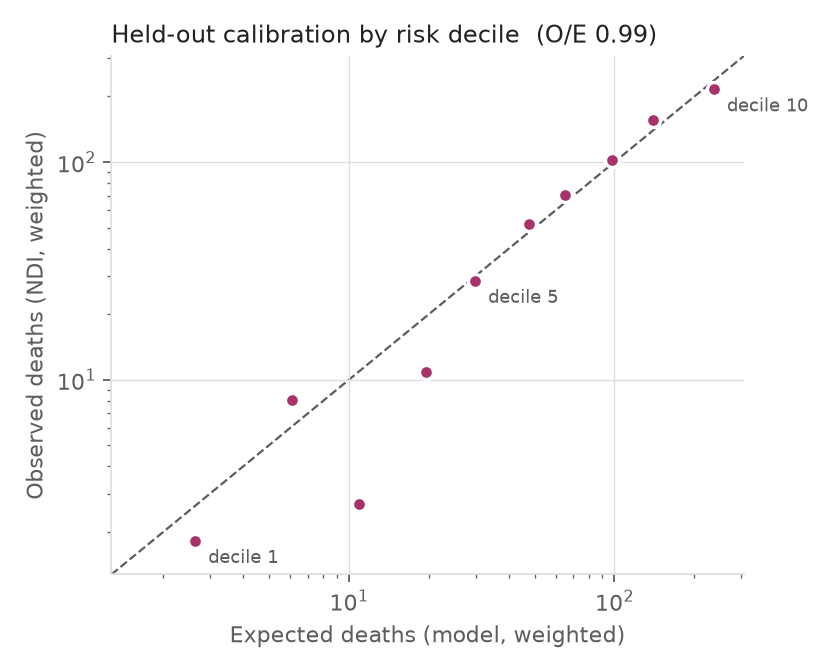
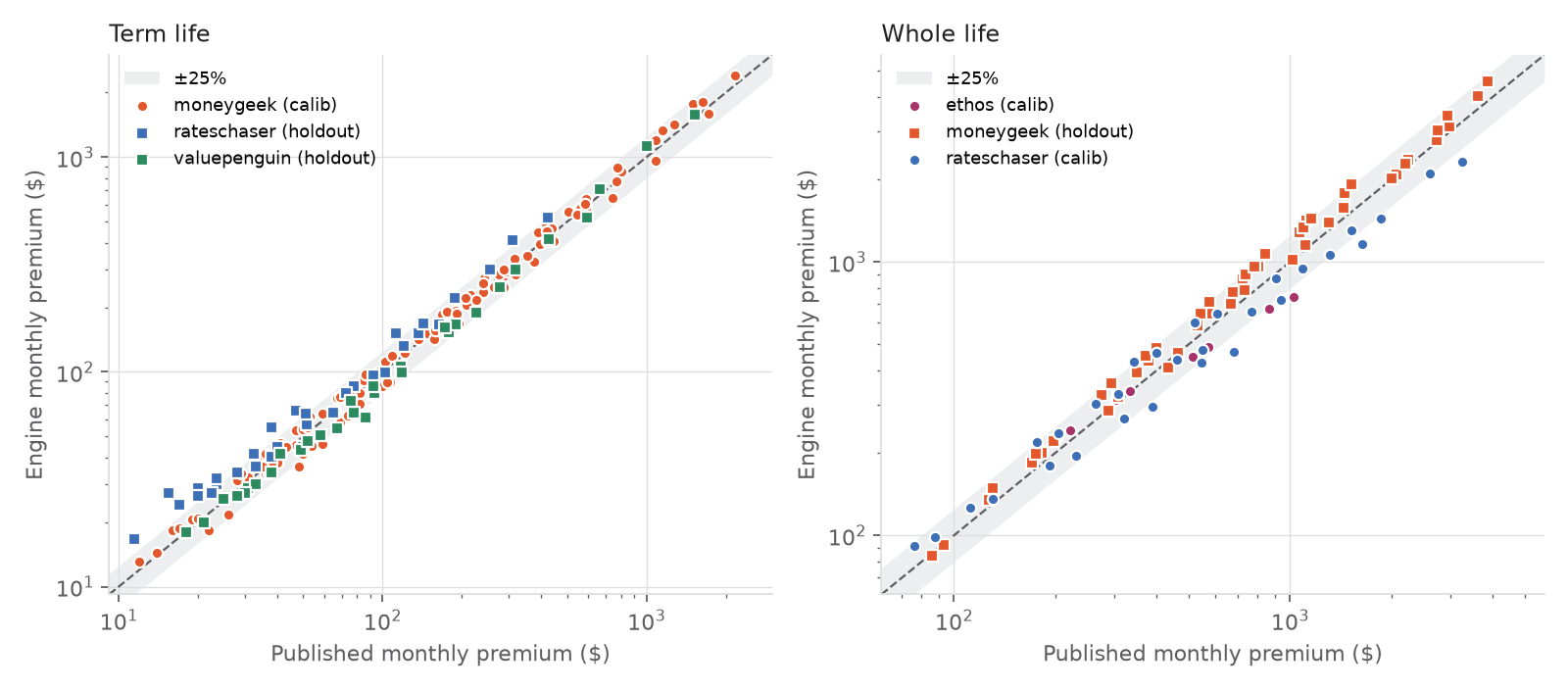
The learned risk ratios were checked against published epidemiology: current smoking at 2.9×, former smoking, heart disease, hypertension and cancer all land in the published range. Diabetes, poor self-rated health and low weight run higher than the literature, severe obesity lower, and the report says so; underwriting rules like the build chart and the diabetes cap cover those gaps.
For each request the engine returns a class with a best-to-worst range, prices for 10 to 30-year terms, permanent life with guaranteed cash values, a recommended term tied to when each need ends, and a term-vs-permanent comparison in this person’s dollars. Every number in the validation report is regenerated by one script, and a model-card endpoint publishes the metrics. These are planning estimates, not quotes.
Compliance
Built inside the rules for talking about life insurance
Life insurance is regulated by the states under the McCarran-Ferguson Act, through model laws from the National Association of Insurance Commissioners that most states adopt. A tool that discusses coverage and prices is doing something those laws govern, even when it sells nothing. We read them before the first screen, and they set the limits on what Steadfast says.
Estimates, never quotes
NAIC Unfair Trade Practices Act (Model 880) · Advertisements of Life Insurance Model Regulation (Model 570)
Misrepresenting a policy’s terms, benefits or price is an unfair trade practice in every state. So every price on every screen says “planning estimates, not quotes”, the health class says the insurer decides after its review, and the PDF says it is not a quote, application or underwriting commitment. The model is instructed never to say someone qualifies or to quote a Lincoln price.
Guaranteed and not-guaranteed kept apart
NAIC Life Insurance Illustrations Model Regulation (Model 582) · Standard Nonforfeiture Law (Model 808)
An illustration may not show a non-guaranteed value as if it were guaranteed. Permanent life cash values here are the guaranteed minimums under the Standard Nonforfeiture Law on the 2017 CSO table, labeled “guaranteed minimum”. The “put the difference aside” figure at 5% sits next to it labeled “not guaranteed”, and the chart says which is which.
A licensed advisor makes the recommendation
NAIC Producer Licensing Model Act (Model 218)
Only a licensed producer may sell, solicit or negotiate insurance. Steadfast shows the tradeoffs in the person’s own numbers and explains why one fits closer; the application and any recommendation come from a licensed Lincoln Financial advisor, who gets the worked plan with the request. The two kinds are named the way Lincoln names them, term life and permanent life, and Lincoln’s permanent product is named truthfully as universal life, not whole life.
Underwriting factors a regulator would recognize
State unfair-discrimination statutes (Model 880, §4) · Colorado SB 21-169 and Regulation 10-1-1 · NAIC Model Bulletin on the Use of AI Systems by Insurers (2023)
Life insurers may classify only by factors tied to expectation of life, and newer rules ask that algorithms be governed, tested and explainable. The engine uses age, sex, build, tobacco, four doctor-diagnosed conditions and self-rated health: the questions on a paper application. No credit score, ZIP code, occupation or purchased consumer data. Every quote returns the factors that moved the class with their multipliers, a model-card endpoint publishes the metrics, and the validation report is regenerated by a script.
Financial and health information, kept to a minimum
Gramm-Leach-Bliley Act, Title V · NAIC Privacy of Consumer Financial and Health Information Regulation (Model 672) · Insurance Data Security Model Law (Model 668) · NYDFS Part 500
Health answers collected for insurance are protected information. The planner works without an account, so most people never store anything. A saved plan holds the five health answers and the facts behind the ledger, and nothing else. The model never receives a name, email or account, and its storage is off. There are no third-party analytics or advertising pixels, and every email is one the person asked for.
Plain language and reachable controls
NAIC Policy Language Simplification Model Act (Model 575) · ADA Title III and WCAG 2.1 AA
States require policies to pass a reading-ease test, and courts apply the ADA to websites. The chat is held to three sentences a turn, every insurance word has a glossary entry that a test keeps jargon-free, reading text is 16px or larger, every control works by keyboard with a visible focus ring, nothing is conveyed by color alone, and motion respects the reduced-motion setting.
Security
What we protect, and how
People tell a planner about their family, money and health. We keep as little as we can, and the model sees less than that.
Only hashes of tokens are stored
Session cookies and password links are 32 random bytes. The database keeps only their SHA-256, so a copy of the tables can’t be used to sign in.
Passwords: bcrypt, cost 12
At least 8 characters and at most 72 bytes, since bcrypt ignores anything longer. A wrong email is checked against a dummy hash, so it takes as long as a wrong password.
Every input is checked on the server
Each server action and the one API route validate their input with zod. Amounts are worked out again on the server, never trusted from the browser. Model and engine replies are parsed against a schema too.
Links are single-use and short-lived
A password link lasts 24 hours and is claimed in one transaction, so it can’t be used twice. Setting a password signs out every other session. One link a minute per account, and the same reply whether or not an email has an account.
No personal data in URLs
Plans live in the database, tied to the account, never in the address bar. The only query value anywhere is a random password-link token. Cookies are httpOnly, SameSite=Lax, and secure in production.
The model sees only the fact sheet
It never gets a name, email or account. It receives their answer or question, the plan’s fact sheet and the chat so far, with storage turned off (store: false). Its output is structured, and the app applies only known fields.
Does it work?
Would Lincoln Financial use it?
The judging note says the core functionality counts for far more than login and password reset. That is how it was built.
The core flow needs no account
Anyone can open the planner and get a priced, explained plan in a few minutes. Sign-in exists only to come back later; it is never on the path to the result.
Lincoln’s products are in the answer
Each plan names the Lincoln policy it’s closest to: TermAccel under $1M with the quick application, LifeElements for larger amounts or older ages, and WealthPreserve 2 IUL for permanent coverage. Terms snap to Lincoln’s 10, 15, 20 or 30 years, and the age and amount limits are checked.
It hands a qualified lead to an advisor
“Talk to an advisor” records a request with the person’s email, a preferred time and the plan attached, so the advisor opens the call with a worked needs analysis instead of a blank form.
What it would take to ship
Swap the engine’s calibrated public rate charts for Lincoln’s rate book and underwriting classes, add filed disclosures, and keep everything else. The engine is one service behind a typed contract, so that swap touches nothing in the app.
Tested
450 automated tests
Everything the plan says about money, every input boundary and every account action is pinned by a test. The suite runs in under three seconds.
450
Automated tests
16 files, under three seconds, run with the typecheck and lint before any change lands.
351
Unit
The pure library: the answer parser, the needs math, the conversation order, every schema, pricing, the Lincoln policy match, the what-if answers, and every glossary explanation.
89
Integration
Server actions and page readers with the model, the engine and the database mocked: accounts and password links, the model’s three tasks, the engine’s tradeoffs, and what each page shows a visitor.
10
Design rules
A lint over the source for the design system: no hex colors, no font sizes off the scale, no round corners, no removed focus rings, no emoji.
Some of what they pin down
- The ledger rows always add up to the figure, and no row is negative.
- The range brackets the estimate and never offers nothing as reasonable.
- Plan B never costs more than Plan A.
- Step order follows Family → Income → Debts → Coverage, and never goes back.
- Only token hashes are stored; a password link works once; a reset signs out every other session.
- Every glossary explanation is at most three sentences, with no jargon inside it.
- “1.2 million”, “$1,800 a month” and “my wife smokes, I don’t” are read the way a person meant them.
- The term-vs-permanent chart and “put the difference aside” agree to the dollar.
The underwriting engine has its own checks: 26 pricing and underwriting invariants, like “a longer term never costs less” and “adding a condition never improves the class”, rerun by the validation script with the held-out metrics.
End to end, a scripted browser walkthrough drives the real app as the demo family before each demo and captures the screenshots on this page, at desktop width and at 390px.
Methodology
How we worked
Storyboard, design system and docs first, then code against them, then verify the same way every time.
01
The conversation was storyboarded first
Family → Income → Debts → Coverage was fixed before any code, and every question was written with its chips, its “why we ask” and the fact it sets. The plan panel follows the same order, so the right side answers the left side.
02
A design system before any screen
Tokens, nine components and the content rules (three sentences a turn, ranges not verdicts, no red, no exclamation marks about money) were written into docs/design and ported into typed components. A design lint test fails the suite when a screen breaks them.
03
Docs as contracts
One project brief for every contributor, human or AI, with the architecture, the rules and the roadmap. A presenter’s runbook with a timed script. A night log with one entry per change: what, why, files, how it was verified.
04
A roadmap, worked in order
Saturday 13:34 first commit, 14:55 design system, 15:07 planner, 18:52 landing, 23:16 dashboard, 00:53 engine deployed as a Vercel service. Then the agreed list: the engine’s tradeoffs in the UI, demo hardening with a seeded account and pre-warmed answers, deploy.
05
Verified the same way every time
Typecheck, lint, build, 450 tests, then driving the real app in a browser at desktop width and at 390px. The screenshots on this page are captured by a script from the running app, as the demo family.
pnpm demo starts the app and the engine together, and pnpm demo:seed resets the demo account and caches the model’s answers for the demo family ahead of time, so the summary and the suggested questions answer instantly.
Complexity
Only as complex as it has to be
Each piece earns its place by doing something the others can’t. Where a dependency would only add weight, there isn’t one.
What we built, and why
- A Python service, because turning health answers into a mortality risk and an actuarial price needs survival models and SOA tables that don’t belong in a browser.
- A fact sheet and a number guard between the model and the screen, because a language model near money needs a fence.
- A local parser beside the model, because a short answer like “85k” shouldn’t wait on the network.
- A term-vs-permanent comparison with “put the difference aside” and a two-policy option, because the stretch goal asked for tradeoffs that apply to this person.
What we left out, on purpose
- No chart library. Five charts are plain SVG, so they fit a phone and take no dependency.
- One API route (the streamed summary). Everything else is a server action with a zod schema.
- No state or form library. React 19 and the derived-state pattern were enough.
- No auth framework. Accounts are an email, a bcrypt hash and a hashed session token over six Postgres tables, kept off the critical path.
- Serving with numpy only: the trained ensemble is 112 KB of weights, so the engine fits a Vercel Python function. PyTorch is a training-only dependency.
Tech stack
What it’s made with
App
- Next.js 16 (App Router, server actions)
- React 19
- TypeScript
- Tailwind CSS v4 with Steadfast tokens
- @react-pdf/renderer
- Lucide icons
Data and services
- Neon Postgres
- Prisma 7 with the Neon driver adapter
- OpenAI Responses API, structured outputs
- Resend
Underwriting engine
- PyTorch 2 for training
- numpy for serving
- Python 3.12, FastAPI, uv
- lifelines as the Cox benchmark
- SOA 2015 VBT and 2017 CSO tables
Open data
- CDC NHANES 1999–2018
- NCHS linked mortality files (National Death Index)
- Society of Actuaries mortality tables
- Published rate charts for calibration
Quality and delivery
- vitest, 450 tests
- zod on every boundary
- Vercel, two services
- pnpm
See it for yourself
Answer a few questions and watch the plan build.